Seasonal Home Office Checklist: Preparing Your Desk for a British Winter

Seasonal Home Office Checklist: Preparing Your Desk for a British Winter
By the second week of November, most home offices have quietly changed character. The window that lit your desk at nine is grey by half past two, the radiator clicks on and off, and the corner where the charger lives has developed a chill. None of it is dramatic on its own. Together, it turns a workspace you liked in June into one you avoid by January. An afternoon of small adjustments is usually enough to put it right.
Light the Desk, Not the Ceiling
From late October, a single ceiling light is doing a job it was never designed for. It floods the room with a flat, unflattering glare that makes every cable look like a tripwire and every shadow like a spill. By three o’clock, you are squinting at the keyboard while the bulb overhead insists it is still midday. The answer is not to buy the brightest lamp in the shop. It is to layer light the way a British winter layers dark.
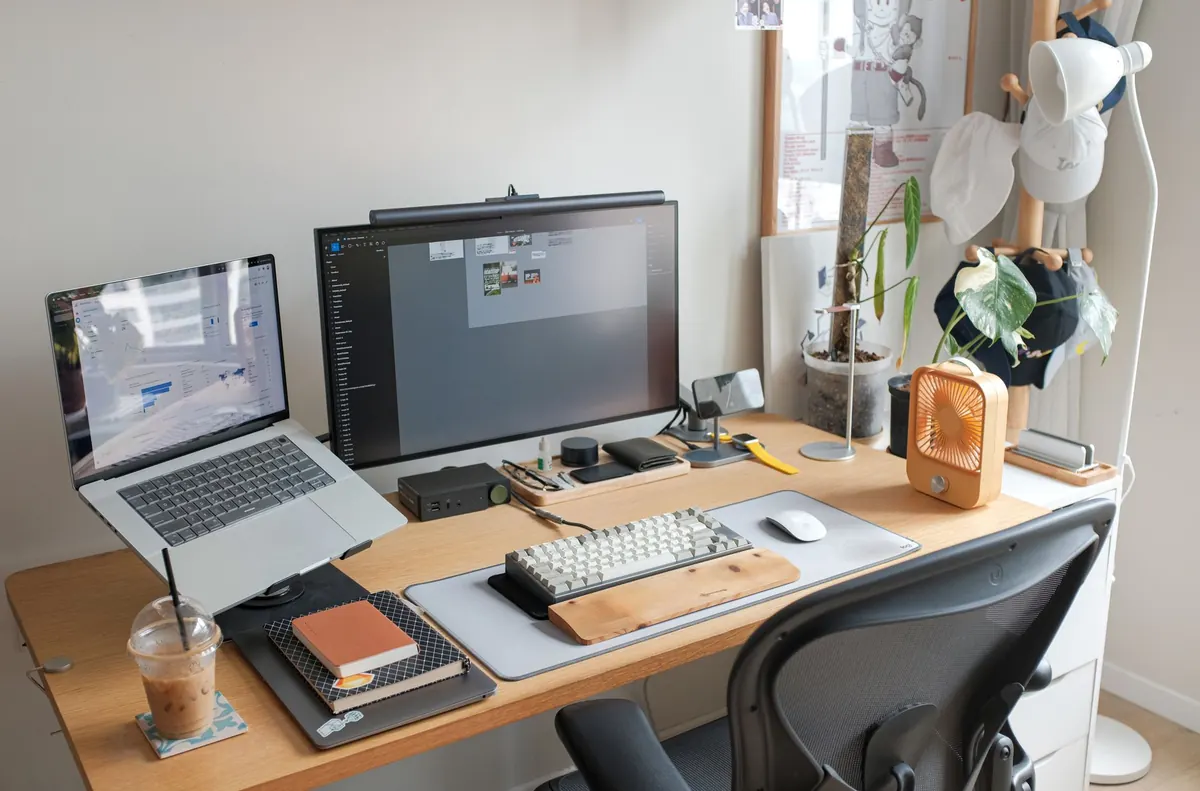
Think in three layers. First, keep some ambient light in the room so your eyes are not fighting a black tunnel. Second, add a task light that falls directly on the keyboard, notebook, or whatever your hands are doing. Third, use a small accent light — a warm lamp on a shelf, a clip-on reading light, even a candle-safe LED — to soften the corners and stop the room feeling like an interview room. The aim is contrast without punishment.
- Ambient: a floor lamp or wall light with a warm-white bulb, ideally on a dimmer or smart plug.
- Task: an adjustable desk lamp with a weighted base and a shade that hides the bulb from your eyeline.
- Accent: a low, warm light behind or beside the monitor to reduce the harshness of a dark wall.
Position your task lamp so your own hand does not cast a shadow over the page. If you are right-handed, place the lamp slightly to your left; if you are left-handed, do the reverse. A daylight bulb around 4000K is useful for detailed work in the morning, but switch to a warmer 2700K–3000K bulb after six in the evening. Otherwise your brain reads the bright blue-white light as lunchtime and wonders why you are still answering emails at nine.
Good desk lighting is less about seeing everything and more about seeing what you are doing without fighting your own shadow.
Stop the Cold Before It Reaches Your Chair
The coldest part of a home office is rarely the middle of the room. It is the floor, the window, and the wall behind you. Cold air falls from glass, slips under doors, and settles around your ankles while you wonder why your shoulders have crept up to your ears. If your desk sits under a window, that window is effectively a refrigerator in reverse: it pulls warmth out of the room and pushes draughts in.
You do not need to rebuild the house. You need to interrupt the path the cold takes. A few targeted fixes will do more than turning the thermostat up another degree.
- Draught-proof the obvious gaps: fit a brush strip to the office door, seal gaps around the window frame, and use a weighted draught excluder if the door is old.
- Move the desk if you can: even half a metre away from a window or external wall can make the difference between shivering and working comfortably.
- Put a rug under the chair: bare floorboards and tiles steal heat from your feet. A thick rug or even a cheap foam mat under the desk is transformative.
- Hang thermal curtains: close them at dusk to trap warmth, but never drape them over a radiator or heater.
Be careful with portable heaters. They are useful, but they are also the cause of many winter accidents. Never plug a fan heater or oil-filled radiator into an extension lead, never leave it running unattended, and keep it at least a metre from curtains, paper, and soft furnishings. If your office has only one socket, get a qualified electrician to add another rather than daisy-chaining adaptors.
A cold desk is not a character flaw. It is a physics problem, and physics responds to practical solutions.
Warm Yourself, Not the Whole House
Heating an entire home to make one desk comfortable is expensive and inefficient. The better strategy is to warm the person, not the room. This is not about being stoic; it is about being specific. A heated throw over the back of your chair, a pair of fingerless gloves, and a hot water bottle at your feet will keep you working long after the central heating has clicked off.
Dress for the Desk
- Layers: a base layer, a fleece or jumper, and a blanket over the knees beat one thick coat you have to take off every time you stand up.
- Slippers: warm feet are not a luxury. They are a productivity tool. Choose enclosed slippers or thick socks rather than flip-flops with a festive pattern.
- Fingerless gloves: ideal for typing. Keep a pair in the desk drawer for the coldest hour before the heating comes on.
- Heated throw: look for one with an auto-off timer and a low-voltage setting. Plug it directly into a wall socket.
- Hot water bottle: fill it before meetings, not during. A covered bottle on your lap is a small, cheap miracle.
Keep the Air from Turning Desert-Dry
Central heating does more than warm the air. It dries it out, which can leave you with itchy eyes, a scratchy throat, static shocks every time you touch a door handle, and a nose that feels like sandpaper. Aim for a relative humidity of roughly 40–60 per cent. A small hygrometer costs little and takes the guesswork out of it.
- Run a small humidifier near, but not directly under, your desk.
- Place a bowl of water on or near the radiator — old-fashioned, but it helps.
- Keep a few plants. They add humidity and make the grey months feel less institutional.
- Open a window for five minutes after lunch, even in winter. A blast of fresh air resets a stuffy, overheated room.
Protect Your Tech from Condensation and Cold
Winter is hard on laptops, phones, and batteries. Lithium-ion batteries discharge faster in the cold, and sudden temperature changes can cause condensation inside devices. If you carry a laptop between a cold car and a warm kitchen, do not open it immediately. Let it acclimatise in its bag for twenty or thirty minutes. The same applies to cameras, headphones, and anything with a circuit board.
- Don’t charge a freezing device: let it reach room temperature first. Charging a cold battery can stress it and reduce its long-term capacity.
- Check your cables: cold makes brittle plastic crack. Inspect charger leads, extension cords, and laptop power bricks for damage.
- Use surge protection: winter storms and fluctuating power are unkind to sensitive equipment. A good surge-protected extension lead is cheap insurance.
- Back up more often: dark afternoons and power cuts are a reminder that your work should not live in one place. Use cloud storage and an external drive.
If you work from a shed, conservatory, or unheated spare room, consider a small dehumidifier. It will not make the room tropical, but it will stop the damp feeling that settles into keyboards, paper, and your mood.
Make the Short Days Feel Longer
The British winter is not just colder. It is darker, and that affects concentration, sleep, and motivation. You cannot change the sunset, but you can change how you meet it. Get outside within an hour of waking if possible, even if it is only for a ten-minute walk around the block. Daylight on your face — cloudy daylight counts — helps set your body clock and makes the afternoon feel less like a slow fade.
- Take lunch away from the desk: even five minutes by a window or outside helps.
- Use a sunrise alarm: waking up in darkness is brutal. A gradual light alarm makes the first hour less of a negotiation.
- Set a hard stop: in winter, work can bleed into the evening because the evening looks like the afternoon. Set an alarm to finish.
- Keep a warm drink ritual: tea, coffee, or hot water with lemon. The ritual matters as much as the caffeine.
Check your posture too. It is tempting to hunch over a keyboard with a blanket around your shoulders, but that folds your spine and shortens your breath. Raise your screen so the top third is at eye level, keep your feet flat on a footrest or the floor, and support your lower back. Warmth should not come at the cost of a stiff neck.
The One-Hour Seasonal Reset
Set aside one afternoon in late October or early November. Put on something comfortable, make a pot of tea, and work through this list. It is not a renovation. It is maintenance, like clearing gutters before the rain.
- Clear and clean: remove mugs, papers, and dead pens. Wipe the desk, keyboard, and mouse. Dust makes the low winter light look dirtier than it is.
- Check the light: replace any flickering bulbs, move your task lamp, and test a warm evening setting.
- Seal the gaps: fit draught excluders, close curtains earlier, and move anything that blocks a radiator.
- Adjust the chair: check seat height, back support, and armrests. Add a cushion or footrest if needed.
- Sort the cables: untangle, label, and replace damaged chargers. Keep them off the floor where cold air pools.
- Stock the drawer: tissues, hand cream, lip balm, spare socks, painkillers, and a torch for power cuts.
- Set the timer: programme lamps and heaters to come on before you start work, so the room is welcoming rather than punishing.
None of this is glamorous. But by the time the January sales arrive, you will not be hunched under a duvet, typing with numb fingers and wondering why you ever liked this room. You will have a desk that works with the season instead of against it — which is, in the end, the whole point of a British winter checklist.
Photo: smartmomblogger / Pixabay