7 Common Home Office Ergonomics Mistakes and How to Fix Them
Most home offices are assembled by accident. You claim a corner of the kitchen table, put a laptop on it and get on with the work. It feels fine for a week. Six months later your shoulders sit up by your ears, your lower back aches by mid-afternoon and there is a permanent crick in your neck.
None of that means you are doing something wrong as a person. It is what happens when a space designed for occasional use turns into a full-time desk. The encouraging part is that almost all of it comes down to a handful of fixable mistakes, and you can correct several of them in ten minutes with things you already own.
1. Treating the laptop as your only computer
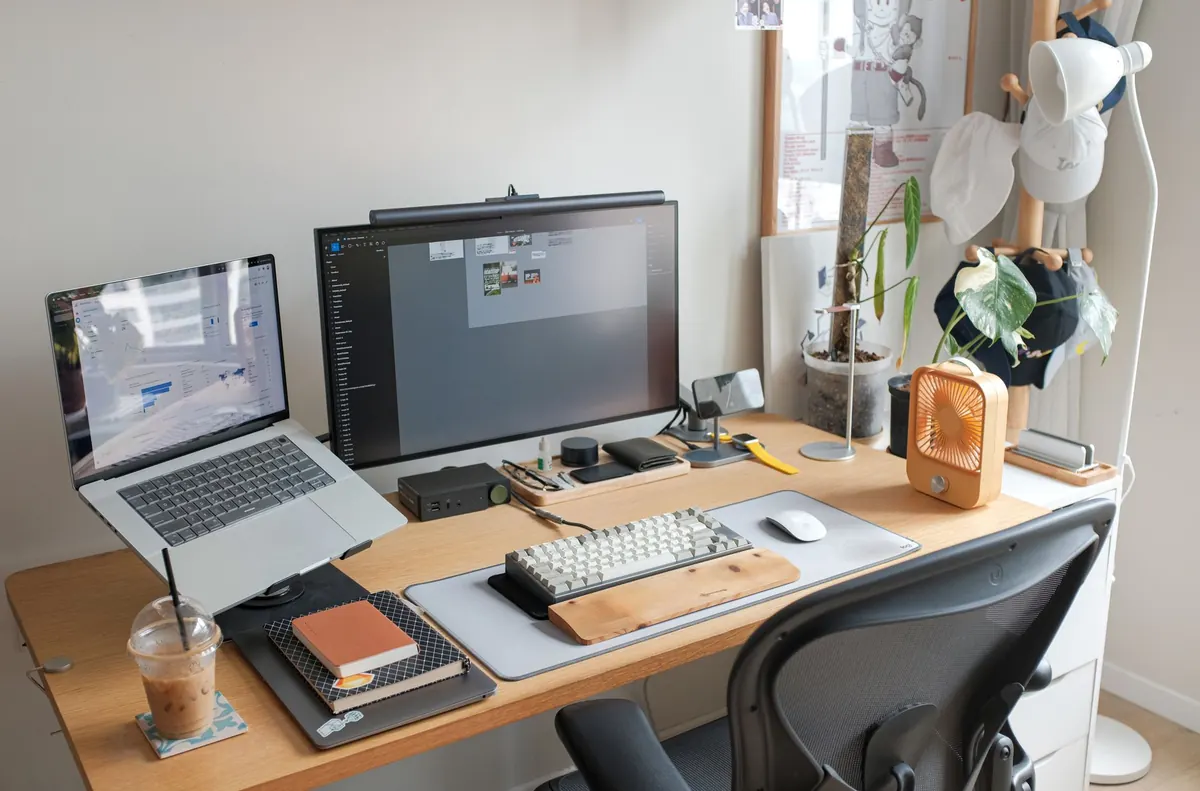
This is the biggest one. A laptop forces a compromise: either the keyboard sits at a sensible height for your hands and the screen ends up far too low, or the screen is right and your arms reach up to a keyboard that belongs near your shoulders. You cannot fix it by sitting up straighter. The two halves of a laptop simply cannot be in the right place at the same time.
The fix
Put the laptop on a stand, a stack of books or a sturdy box so the top of the screen sits at roughly eye level. Then add a separate keyboard and mouse down at desk height, with your elbows hanging loosely by your sides. Neither item needs to be expensive. This single change makes the biggest difference to how your neck and shoulders feel by the end of the day.
2. Setting the screen at the wrong height
Screen problems rarely come alone. If the monitor is too low you crane your neck forward and down. Too high and you tilt your chin up, which tightens the muscles at the base of your skull.
Aim for the top of the screen to sit at, or just below, eye level. You should be able to read the whole page by moving your eyes rather than your head. Push the screen to about arm's length away — roughly 50 to 70 centimetres for most people — and tilt it back very slightly so it faces you squarely. If the text still feels small, increase the zoom rather than leaning in.
If you wear varifocals or bifocals, you may find a slightly lower screen suits you better, because you read through the lower part of the lens. If you are constantly tipping your head back to see clearly, an eye test will help more than another cushion.
3. Ignoring your feet
Feet are the easiest thing to forget, because you cannot see them. Hanging feet, ankles tucked back and permanently crossed legs all push pressure into the backs of your thighs and tilt your pelvis. After an hour or two that shows up as a dull ache in your lower back.
Adjust your chair so your feet rest flat on the floor and your thighs are roughly horizontal, sloping very slightly down towards your knees. If your desk is too tall to allow that, do not raise the chair and let your feet dangle — use a footrest instead. A sturdy box, a stack of heavy books or an old drawer will do. The point is to have something solid under your feet so your legs can take some of the load.
4. Getting the chair height and seat depth wrong
The chair is the foundation, and a few small adjustments cover most of it:
- Seat height: your hips should be level with, or slightly higher than, your knees.
- Seat depth: leave a gap of about two or three fingers between the back of your knee and the front edge of the seat. If the edge presses into your legs, slide forward or add a cushion behind you.
- Lower back: the curve of the backrest should meet the small of your back. A rolled towel or a small cushion does the job if it does not.
- Armrests: lower them, or push them aside, if they lift your shoulders even slightly.
Treat the famous right angles as a starting point rather than a rule. Ninety degrees at hips, knees and elbows is a reasonable place to begin, but nobody holds that position for eight hours. Moving around is fine. A brief slouch is fine. What is not fine is staying in one shape all afternoon.
5. Reaching for the keyboard and mouse
Keep the keyboard close enough that your elbows stay near your body and your shoulders can drop. If you have to stretch forward, you will round your back within minutes and stay that way.
Your wrists should be roughly straight, not bent upwards or angled sideways. If your keyboard has fold-out feet at the back, try it flat for a week; many people find it easier on the wrists. A wrist rest is for resting between bursts of typing, not for leaning on while you type.
The mouse is the usual culprit. Put it immediately beside the keyboard, close to your body, so you are not reaching across the desk dozens of times an hour. Where you can, learn the keyboard shortcuts for the tasks you repeat most. Every reach for the mouse is a small shoulder movement, endlessly repeated.
6. Fighting the light
Where you sit in relation to the window matters as much as your chair. Sit side-on to it where possible. Facing a bright window leaves you squinting at a dark screen, while sitting with the window behind you throws glare and reflections straight across the display.
Adjust the blinds or hang a light curtain. Match your screen brightness to the room, because a screen that blazes away in a dim space is tiring to read. If you work in the evening, a small desk lamp that lights the area around your keyboard is more comfortable than a bright ceiling light overhead.
7. Sitting still for hours
The quietest mistake is not moving at all. No chair is designed to hold you in one position for a whole working day. Muscles stiffen, circulation slows and even a good posture starts to feel wrong after forty minutes.
Set a timer and stand up every half an hour or so. Walk to the kettle, take a call standing, roll your shoulders, stretch your neck and upper back slowly. Give your eyes a break too: look away from the screen at something roughly six metres away for twenty seconds or so, every twenty minutes.
If you are dealing with persistent pain, numbness or tingling, do not try to stretch your way through it. Speak to your GP, a physiotherapist or another qualified professional.
A ten-minute reset
Work through this once, and you will have fixed most of the problems above:
- Set your chair height so your feet are flat and your knees are level with or slightly below your hips.
- Check the gap behind your knees, and add lower back support if you need it.
- Raise the laptop on books or a stand until the top of the screen is at eye level.
- Add a separate keyboard and mouse, positioned close to your body.
- Move the mouse right next to the keyboard.
- Turn your desk side-on to the window, and deal with any glare.
- Set a timer to stand up every half an hour.
None of it needs to be perfect, and nothing here requires a new desk or an expensive chair. Small, consistent adjustments beat a single dramatic overhaul every time. Start with the chair and the laptop, because those two unlock most of the rest. Then leave everything alone for a week and notice how you feel by Friday afternoon.
Photo: nrjfalcon1 / Pixabay